Frequently asked questions
About the USB/Centronics adapters
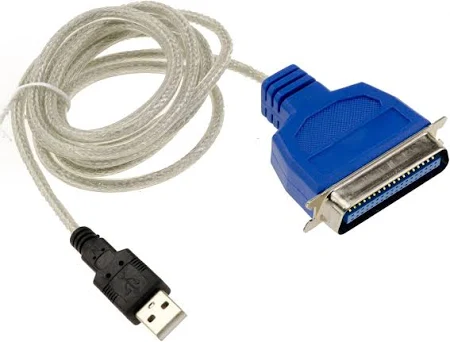
USB to Centronics Printer Adapter; Yes they can be used to test the interface.
They can be used to connect to a Centronics printer or to the Libre-Printer interface. Provided that this port is configured as an ESC or PCL printer in CUPS.
See some examples of drivers for Epson Dot Matrix & Stylus printers, and also for HP Deskjet & LaserJet PCL printers:
- EPSON 9-pin Dot Matrix, epson9.ppd
ESC/P, B/W, 60x72, 120x72, 240x72 dpi
- EPSON 24-pin Dot Matrix, epson24.ppd
ESC/P, B/W, 120x180, 180x180, 360x180, 360x360 dpi
- EPSON Stylus Color, stcolor.ppd
ESC/P2, B/W/CMYK, 180, 360, 720 dpi
- EPSON Stylus Photo, stphoto.ppd
ESC/P2, B/W/CMYK, 180, 360, 720 dpi
- HP DeskJet, deskjet.ppd
PCL, B/W/CMYK, 150, 300, 600 dpi
- HP LaserJet, laserjet.ppd
PCL, B/W, 150, 300, 600 dpi
These drivers are embeded in CUPS as you can see it on their repository.
But you can also download them on this website: Openprinting Epson Dot Matrix.
About the support of the bridge with modern printers
Libre-Printer offers a way to forward the data to be printed to another printer.
The support of other printers can be a problem problem but it’s not the responsibility of the project because this part is handled by CUPS and its embedded drivers on GNU/Linux distributions. However, it should be noted that new printers are quickly supported (within a few months) and that the standardization of GNU/Linux drivers has made great progress in the last few years.
In the worst case manufacturers provide proprietary drivers for their machines. Check this link for GNU/Linux compatible printers via CUPS: openprinting.org.
Is the project compatible with RetroPrinter binaries?
The project is designed as a drop-in replacement for RetroPrinter binaries.
It should be noted that (in 2021) of all their binaries only convert-escp2 (the Epson ESC instruction converter) is the one that is really useful.
The other executables are only used to move the print files or to perform minor perform minor actions; they have all been reimplemented in the code of Libre-Printer.
You can reuse the convert-escp2 executable from Retroprinter as is in the provided disk image without moving it, as long as you enter its path in the configuration file for Libre-Printer (/etc/libre-printer/libreprinter.conf).
You can also install the version we package for Libre-Printer. Note that in the later case the configuration files for the converter are located in XXX (TBR).
Can I connect multiple printers/interfaces?
Yes! Unlike the Retroprinter project which monopolizes one Raspberry Pi per printer you can support as many printers as available USB ports.
See the chapter Configuring multiple interfaces on a single computer for more info.
How do I recognise my interface type?
Note that most DB-25 cables (25 pins) with DB25 connectors at both ends are serial cables. This was the standard RS-232 connector before the more compact DE-9 or erroneously called DB-9 (9-pin) connectors were introduced in the 1980s, and sometimes for other purposes than a serial link (cf. on Wikipedia: RS-232, connecteurs D-sub).
Some ressources for the serial connector pinouts
Norms: RS-232, EIA RS-232, EIA 232, TIA 232.
Connector names: DE-9 (male on the DTE (Data Terminal Equipment) side), DB-9 (wrongly named), DB-25 or D-Sub 25 (female on the DTE side).
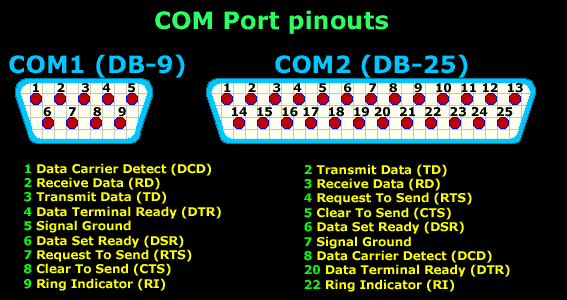
COM Port pinout DE-9 DB-25, Female port, Computer side

COM Port pinout DB-25, Female port, Computer side
Sources: www.aggsoft.com, firewall.cx.
Some ressources for the Centronics/parallel connector pinouts
Norm: IEEE 1284.
Connector names: LPT (Line Printing Terminal), DB-25 or D-Sub 25 (female on the computer side), Centronics or CN36 (female on the printer side).
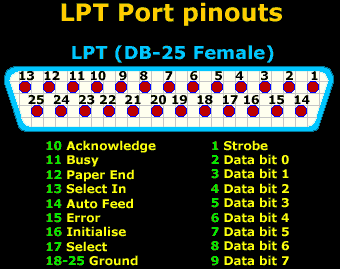
LPT Port pinout DB-25, Female port, Computer side
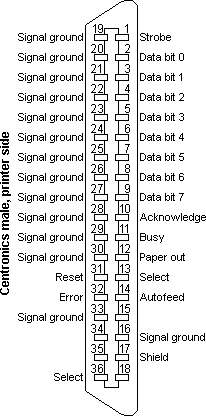
Centronics Port, CN36, Female port, Printer side
Sources: firewall.cx.
Hardware test
Test the DTR pin (pin 20) of the DB25 connector with a multimeter. If you found more than 5V on it (and by extension more than 5V on any pin), you have a Serial RS-232 interface.
Software test
Any configuration option that relates to the notions of parity, number of bits exchanged or transfer speed in bauds means that it is a serial RS-232 interface.